Streamline your Amazon FBA 2D Transparency program
Native Amazon Transparency API integration lets you automatically generate and import Transparency codes, prevent reuse, and print combined labels in one pass for high-volume FBA prep.
Get started Request a demoImport & Track Transparency Codes
Connect directly to the Amazon Transparency API to automatically generate and import required codes by SKU, then track availability as labels are printed to help prevent accidental reuse.
Custom Labels
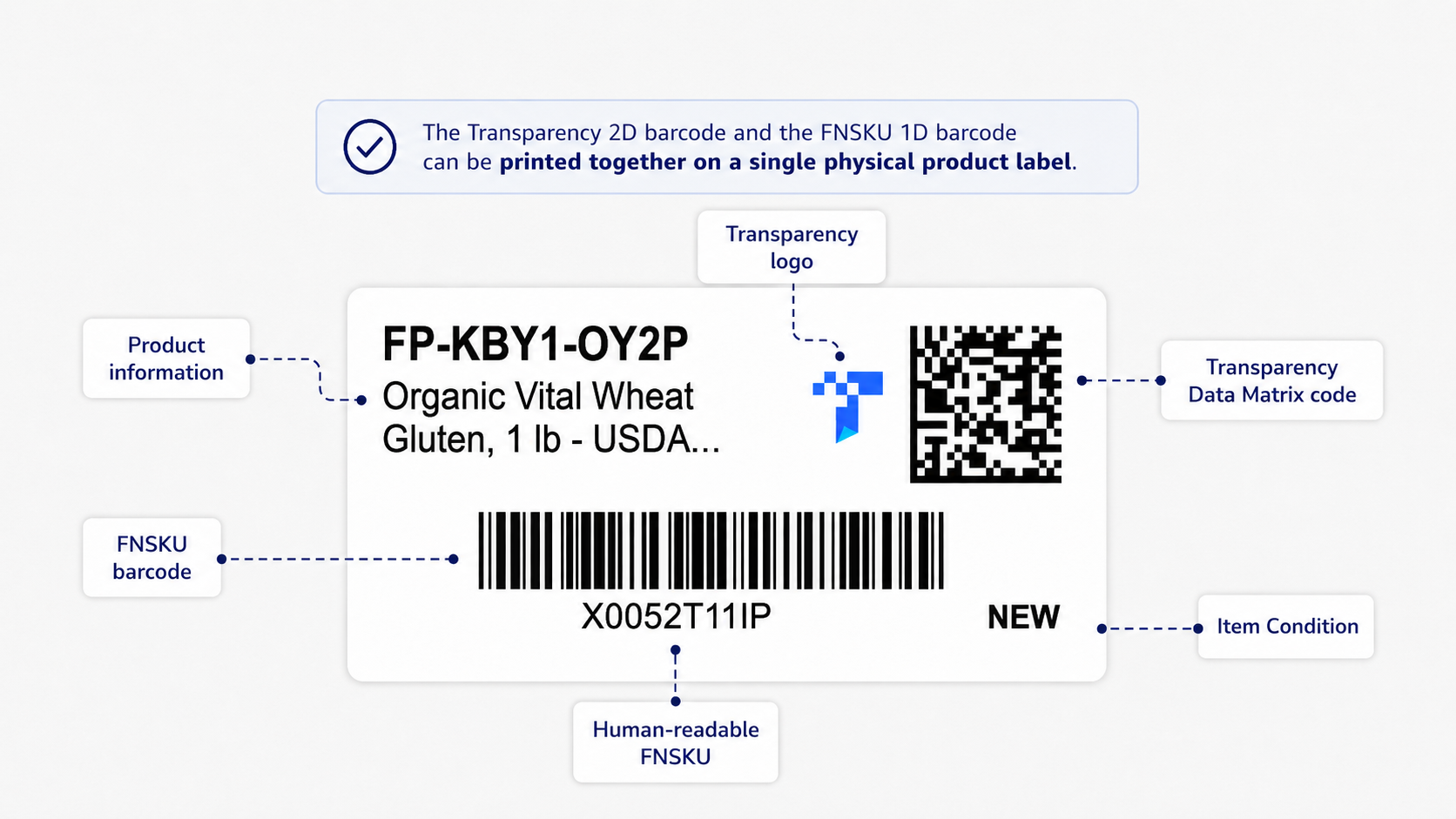
Integrate the 2D barcode into a custom designed FNSKU label, combining both on a single physical label to streamline preparation and labeling.
Many More Features
Streamline your prep for your 2D Transparency program. Move faster with guardrails: enforce code availability, reduce mislabels, and keep a clear audit trail of what was printed.
Enforced "No Code, No Print" Controls
A SKU enrolled in Transparency can be blocked from printing unless unused codes are available, helping prevent shipments from leaving the building without the required 2D code.
Visibility & Reporting
See how many codes are available vs. used by SKU, and keep your team ahead of replenishment so printing never stalls.
Common Amazon FBA Transparency Labeling Questions
If you can't find an answer, please contact our team. We're here to help.
Yes. FNSKU Studio supports combined label layouts that include both the Transparency 2D code and your FNSKU barcode on one physical label, so your team labels in one step.
Transparency barcodes are generated for each specific ASIN. They are tied to the child ASIN, not the parent SKU.
Once enrolled, a brand receives unique Transparency codes for its products. These codes, which look like a “T” followed by a 2D barcode, must be applied to the packaging of each unit. When a Transparency-enabled product arrives at an Amazon fulfillment center, the barcode is scanned to ensure its authenticity before it is added to the seller’s inventory.
Once a product is enrolled in the Transparency program, any seller attempting to list that item will be required to provide a valid Transparency code. This effectively prevents unauthorized sellers from listing your product.
No, Amazon does not currently offer a service to apply Transparency labels to products already in their fulfillment centers. The responsibility for labeling rests with the seller before the inventory is shipped to Amazon.
No. An FNSKU identifies the seller/SKU for FBA inventory. A Transparency code is a unique per-unit authenticity code. One SKU may have thousands of unique Transparency codes.
Yes, once protections are active, all units must have an Amazon-issued Transparency code or an approved existing serial code connected to Transparency.
Download your codes from Amazon and upload them into FNSKU Studio. Codes are stored by SKU so they're ready at print time and can be tracked over time. We also have a native integration via the Transparency API so you can purchase and sync transparency codes right from the app.
Yes. For items enrolled in Transparency, you can enforce "no code, no print" behavior so labels won't print unless unused codes are available.
Yes. You can import CSV files with Transparency codes into FNSKU Studio and use them in your normal labeling workflow.
Yes. You can use the same workflow across marketplaces, including the United States, Canada, and the United Kingdom. Standardizing your process helps your team move faster, maintain consistent labeling standards, and reduce operational errors when managing multi-marketplace FBA prep.
Yes, absolutely. You can combine Transparency labeling with your existing FNSKU, expiration date, and prep label requirements in one streamlined process. This reduces extra handling, improves labeling consistency, and helps your operation stay compliant while scaling output.